---
title: "Productive Screen Time for Kids: A Parent (and Teacher) Guide for 2026"
description: What is productive screen time? Evidence-based insights for parents and how coding supports digital literacy in 2026.
image: https://blogs.codeavengers.com/hubfs/Screenshot%202026-03-30%20at%2012.21.55%20PM.png
---
[](https://www.codeavengers.com)
- Learn + Tech
Show submenu for Learn + Tech
- [Coding for Kids](https://www.codeavengers.com/jr)
- [Digital Skills for Ages 12+](https://www.codeavengers.com/pro)
- [Code Avengers in Schools](https://www.codeavengers.com/edu)
- [Professional Development for Teachers](https://www.codeavengers.com/pd)
- Impact
Show submenu for Impact
- [Customer Success](https://blogs.codeavengers.com/content/tag/customer-success)
- [Global Reach](https://www.codeavengers.com/global-reach)
- [Indigitech](https://www.codeavengers.com/indigitech)
- [Testimonials](https://www.codeavengers.com/testimonials)
- Explore
Show submenu for Explore
- [Our Community](https://code-avengers.mn.co/share/ILDeNr0PWnDxIqQp?utm_source=manual)
- [Blog](https://blogs.codeavengers.com/content)
- [About Us](https://www.codeavengers.com/about)
- [Contact Support](https://www.codeavengers.com/support)
- Events
Show submenu for Events
- [Cyberscape 2026](https://www.codeavengers.com/events/cyberscape-2026)
- [Digital Navigators](https://www.codeavengers.com/digital-navigators)
- Learn + Tech
Show submenu for Learn + Tech
- [Coding for Kids](https://www.codeavengers.com/jr)
- [Digital Skills for Ages 12+](https://www.codeavengers.com/pro)
- [Code Avengers in Schools](https://www.codeavengers.com/edu)
- [Professional Development for Teachers](https://www.codeavengers.com/pd)
- Impact
Show submenu for Impact
- [Customer Success](https://blogs.codeavengers.com/content/tag/customer-success)
- [Global Reach](https://www.codeavengers.com/global-reach)
- [Indigitech](https://www.codeavengers.com/indigitech)
- [Testimonials](https://www.codeavengers.com/testimonials)
- Explore
Show submenu for Explore
- [Our Community](https://code-avengers.mn.co/share/ILDeNr0PWnDxIqQp?utm_source=manual)
- [Blog](https://blogs.codeavengers.com/content)
- [About Us](https://www.codeavengers.com/about)
- [Contact Support](https://www.codeavengers.com/support)
- Events
Show submenu for Events
- [Cyberscape 2026](https://www.codeavengers.com/events/cyberscape-2026)
- [Digital Navigators](https://www.codeavengers.com/digital-navigators)
[Log In](https://account.codeavengers.com/login)
[Start For Free](https://account.codeavengers.com/signup)
Featured Post
# Learn Python With Code Avengers

Written By [Hannah Taylor](https://blogs.codeavengers.com/content/author/hannah-taylor)
June 17, 2016
[Read Article](https://blogs.codeavengers.com/content/learn-python-with-code-avengers)

Written By [Hannah Taylor](https://blogs.codeavengers.com/content/author/hannah-taylor)
June 17, 2016
[ back](https://blogs.codeavengers.com/content)
[Guide](https://blogs.codeavengers.com/content/tag/guide)
# Productive Screen Time for Kids: A Parent (and Teacher) Guide for 2026

Written By [Natalie Li](https://blogs.codeavengers.com/content/author/natalie-li)
May 05, 2026

Written By [Natalie Li](https://blogs.codeavengers.com/content/author/natalie-li)
May 05, 2026
### Productive Screen Time for Kids: A Parent (and Teacher) Guide for 2026
Screens are everywhere in children’s lives.
They appear during a long car ride.
At the kitchen bench while dinner is cooking.
In classrooms delivering structured learning.
On tablets used for homework or creative projects.
For many families, the question isn’t whether kids use screens, it’s how they can use them well. It is whether that time is passive, interactive, or genuinely productive.
Research increasingly suggests that the impact of screen time is influenced by what children do on devices, not duration alone. This guide explains the evidence, busts common myths, and offers practical tips to turn screen time into *productive screen time* — time that supports learning, creativity, connection, and development.
As digital technologies become more embedded in childhood, the conversation needs to move beyond simple limits and toward quality, purpose, and outcomes.
This article focuses on school-aged children. Research and guidance for infants and preschool-aged children differ, with a stronger emphasis on limited and supported screen use in early childhood.
## What the Research Actually Says About Screen Time
Research in child development and digital media increasingly shows that screen time cannot be evaluated by duration alone. *See the research reference list at the end of this article for further reading.*
The impact of screen use is influenced by factors such as:
- Content (what children are engaging with)
- Context (how and where it is used)
- Displacement (whether it replaces sleep, movement, or social interaction)
Passive (for example, watching videos, scrolling social feeds, or uninvolved consumption), high-volume use can be associated with poorer wellbeing outcomes. This is particularly evident when the passive screen time displaces sleep or physical activity.
Research suggests that interactive, cognitively demanding digital activities may be associated with different developmental outcomes than passive consumption.
Educational research suggests that structured, goal-oriented digital learning environments can support:
- Problem-solving skills
- Early computational thinking
- Self-regulated learning
- Transferable digital literacy
When digital environments are intentionally designed around clear learning goals, structured progression, and meaningful feedback, they provide opportunities for skill development rather than passive consumption. The difference lies not in the presence of a screen, but in how the learning experience is designed, and whether children are consuming or creating.
## Defining Productive Screen Time
Productive screen time is:
- Intentional
- Interactive
- Skill-building
- Thought-provoking
- Structured
- Feedback-rich
- Developmentally appropriate
- Balanced with offline experiences
It asks children to think, test ideas, make decisions, and reflect.
It does not simply entertain.
## Mythbusting: Common Misconceptions
**Myth 1: All screen time is bad for kids.**
Fact: Research shows that content and context matter more than minutes alone. Passive, high-volume consumption is different from structured, cognitively engaging activities aligned with learning goals.
**Myth 2: Screen use automatically harms brain development.**
Fact: Current evidence does not show consistent harmful effects from moderate screen use within healthy routines. Outcomes depend on sleep, movement, and adult guidance.
**Myth 3: Educational apps are automatically beneficial.**
Fact: Not all digital learning tools are evidence-based. Quality design, structured progression, feedback, and cognitive challenge matter more than labels.
## What Productive Screen Time Looks Like on Code Avengers JR
On Code Avengers JR (designed for learners approximately 5–14), screen time is structured around progressive skill development, with learning embedded within age-appropriate, relevant contexts.
Children are not scrolling. They are:
- Uncovering core computer science concepts
- Exploring computational thinking in action
- Building on math and science foundational learning
- Writing simple code sequences
- Debugging logic errors
- Designing interactive stories and games
- Improving literacy skills
- Learning how data works
- Exploring foundational AI concepts in age-appropriate ways
- Practising problem-solving through guided challenges
Each task is scaffolded. Concepts build on previous learning. Feedback is immediate.
These activities require children to plan, test, revise, and reflect. In cognitive terms, this mirrors many of the same processes involved in offline problem-solving and creative work. The screen becomes a medium for thinking, rather than the focus of attention.
This matters because cognitive science shows that learning improves when:
- Tasks increase in structured complexity
- Feedback is timely and specific
- Practice is spaced and iterative
- Learners actively retrieve and apply knowledge
Code Avengers JR is intentionally designed around these principles.
## What Makes Code Avengers Different from Generic “Coding Apps”
Many products rely on gamification to engage or as entertainment. Code Avengers JR focuses on story-based learning with authentic contexts for younger learners and relatable characters and themes. Course content is naturally engaging, with structured progression and real-world learning.
Key features that make this platform distinct:
##### 1. Scaffolded Curriculum Design
Courses are designed by experienced educators and instructional designers, not generated by AI or assembled from disconnected activities.
Learners move through clear sequences with defined learning goals.
##### 2. Immediate, Formative Feedback
The platform includes built-in code checking and task validation. Students see instantly whether their logic works, supporting iterative learning rather than guesswork.
##### 3. Parent and Child Account Structure
Parents can create a parent account and manage child accounts under it. This supports:
- Progress monitoring
- Age-appropriate access
- Controlled learning pathways
Great for homeschooling, or productive screen time after school / on weekends.
##### 4. Teacher Dashboard and Classroom Controls
For school environments, teachers can:
- Track progress across students
- Monitor task completion
- View time-on-task data
- Access course teaching notes, comprehensive lesson plans, unit plans and unplugged activities
- Simplify logins for younger students using quick access tools
- Enable additional controls to meet school compliance and data security requirements
This supports productive use within limited classroom time.
##### 5. Accessibility and Inclusion
The platform includes built-in accessibility features such as:
- Clear interface design
- Dark mode (PRO), various interface colour background options (JR)
- Audio dialogue to reduce reading pressure on younger learners
- Structured instructions
- Varied instruction and learning delivery (audio, video, quiz, interactive task, etc)
- Scaffolded hints
- Intentionally prioritising high-frequency English vocabulary to support young readers and English language learners.
- Multi-lingual support for many courses
These support diverse learning needs while maintaining cognitive challenge.
##### 6. Data Privacy and Compliance
For families and schools, privacy is not optional.
Code Avengers complies with relevant data protection frameworks, including:
- COPPA regulations for children’s online privacy (United States)
- GDPR-aligned practices in applicable regions
- ST4S assessment alignment for Australian and New Zealand schools
Student data is protected, and advertising-based engagement models are not used. You can find out more about how Code Avengers handles data from the privacy policies on our website, or by reviewing our [Common Sense Privacy Evaluation.](https://privacy.commonsense.org/evaluation/Code-Avengers)
This ensures screen time is focused on learning, not data extraction.
## The Balance Question
Productive screen time should not replace:
- Sleep
- Physical activity
- Outdoor play
- Social interaction
- Family conversation
Healthy development still depends on sleep, movement, relationships, and offline experiences.
However, it is increasingly unrealistic to treat all screen time as harmful.
The more useful question is:
Is this screen time building something?
If children can explain what they are learning, demonstrate new skills, and apply them in future tasks, their screen use is contributing to growth.
## Why This Matters in 2026
Children now encounter algorithmic systems daily, from search results and streaming recommendations to AI-generated media, automated moderation, and personalised digital platforms. These systems influence what they see, what they trust, and how they interact online.
Digital literacy now includes understanding:
- How systems are built
- How data shapes outcomes
- How automated decisions are made
- How to question digital outputs
- How to create responsibly within digital environments
Early exposure to structured coding and computational thinking supports these capabilities. When children learn how digital systems are constructed, they are better equipped to evaluate them critically rather than simply accept them.
## A Framework for Parents
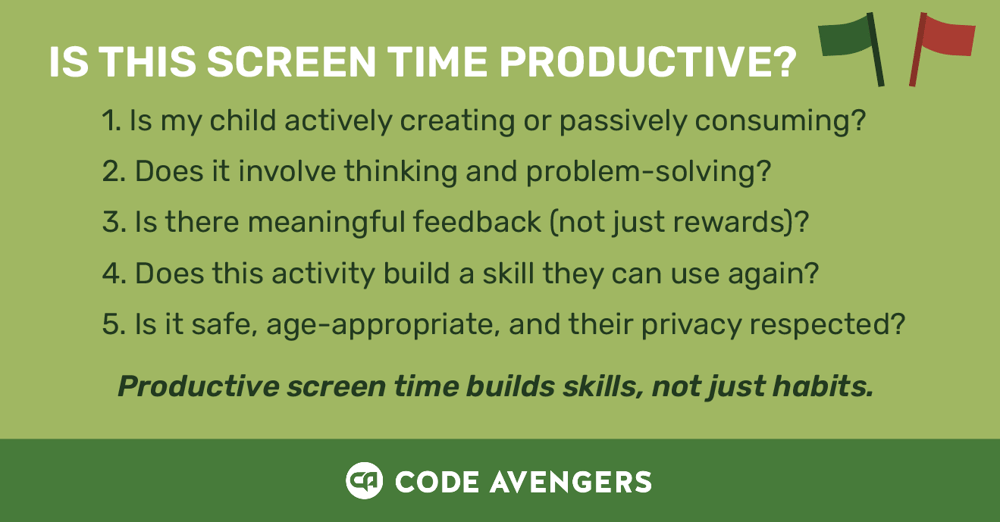
When evaluating digital activities, consider whether your child will be creating, learning, developing transferable skills, and whether they'll be safe and respected.
## The Takeaway
The conversation about screen time has evolved.
It is no longer only about limiting exposure. It is about evaluating quality, purpose, and outcomes.
Screens can distract.
They can also develop.
When digital activities require thinking, problem-solving, creativity, and reflection, they become part of a child’s learning ecosystem rather than a break from it.
Families do not need to eliminate screens to protect wellbeing. They need clarity about which digital experiences build skills and which simply consume attention.
Productive screen time is not defined by novelty or entertainment. It is defined by growth.
That distinction changes how screen time is chosen, structured, and discussed at home and in school.
## *A Note for Teachers:*
In schools, screen time is often part of structured, curriculum-aligned learning. Communicating that structure clearly matters.
Explaining how digital tools are used in the classroom, what skills they develop, how progress is supported through feedback, and how online tasks connect to discussion and offline practice helps families understand the educational intent behind device use.
Framing digital activities around learning outcomes rather than minutes supports shared expectations between school and home.
**Looking for guidance on online safety?** \[Download our family cybersafety guide\]
**Want to learn more about coding for kids?** \[Read our guide to computer science for young learners\]
## References and further reading
This article draws on research in child development, digital media, and learning science. Selected references are listed below for readers who want to explore the evidence in more depth.
- **Kar, S. S., Dube, R., Goud, B. K. M., Gibrata, Q. S., El-Balbissi, A. A., Al Salim, T. A., & Fatayerji, R. N. M. A. K. (2025).** *Impact of screen time on development of children.* **Children, 12**(10), 1297. [https://doi.org/10.3390/children12101297](https://doi.org/10.3390/children12101297)
- **Hirsh-Pasek, K., Zosh, J. M., Golinkoff, R. M., Gray, J. H., Robb, M. B., & Kaufman, J. (2015).** *Putting education in “educational” apps: Lessons from the science of learning.* **Psychological Science in the Public Interest, 16**(1), 3-34. [https://doi.org/10.1177/1529100615569721](https://doi.org/10.1177/1529100615569721)
- **Orben, A., & Przybylski, A. K. (2019).** *The association between adolescent well-being and digital technology use.* **Nature Human Behaviour, 3**, 173-182. [https://doi.org/10.1038/s41562-018-0506-1](https://doi.org/10.1038/s41562-018-0506-1)
- **Przybylski, A. K., & Weinstein, N. (2019).** *Digital screen time limits and young children’s psychological well-being: Evidence from a population-based study.* **Psychological Science, 30**(1), 44-53. [https://doi.org/10.1177/0956797619830329](https://doi.org/10.1177/0956797619830329)
- **Chi, M. T. H., & Wylie, R. (2014).** *The ICAP framework: Linking cognitive engagement to active learning outcomes.* **Educational Psychologist, 49**(4), 219-243. [https://doi.org/10.1080/00461520.2014.965823](https://doi.org/10.1080/00461520.2014.965823)
- **OECD. (2021).** *Digital Education Outlook 2021.* Organisation for Economic Co-operation and Development. [https://www.oecd.org/education/digital-education-outlook/](https://www.oecd.org/education/digital-education-outlook/)
[](https://www.codeavengers.com)
[Follow us on Facebook](https://www.facebook.com/CodeAvengers/) [Follow us on Twitter](https://x.com/codeavengers) [Follow us on YouTube](https://www.youtube.com/channel/UC7HKtyaPf9UmzQLuQnRzmpg/videos) [Follow us on Instagram](https://www.instagram.com/code_avengers/) [Follow us on Linkedin](https://www.linkedin.com/company/code-avengers/)
Learn + Teach
[Coding for Kids](https://www.codeavengers.com/jr)
[Digital Skills for Ages 12+](https://www.codeavengers.com/pro)
[Code Avengers in Schools](https://www.codeavengers.com/edu)
[Professional Development for Teachers](https://www.codeavengers.com/pro)
Impact
[Customer Success](https://blogs.codeavengers.com/content/tag/customer-success)
[Testimonials](https://www.codeavengers.com/testimonials)
[Indigitech](https://www.codeavengers.com/indigitech)
Explore
[Our Community](https://code-avengers.mn.co/)
[Blog](https://blogs.codeavengers.com/content)
[About Us](https://www.codeavengers.com/about)
[Digital Navigators](https://www.codeavengers.com/digital-navigators)
Support
[Start For Free](https://account.codeavengers.com/signup)
[Log In](https://www.codeavengers.com/login)
[Pricing](https://www.codeavengers.com/pricing)
[Contact Support](https://www.codeavengers.com/support)
Copyright © 2025 Digital Education Ltd
[Cancellation Policy](https://www.codeavengers.com/cancellation)
[Privacy Policy](https://www.codeavengers.com/privacy)
[Cookie Policy](https://www.codeavengers.com/cookies)
[Terms of Service](https://www.codeavengers.com/terms)
```json
{
"@context" : "https://schema.org",
"@type" : "BlogPosting",
"author" : {
"@type" : "Person",
"name" : "Natalie Li",
"url" : "https://blogs.codeavengers.com/content/author/natalie-li"
},
"dateModified" : "2026-05-04T17:00:01.170Z",
"datePublished" : "2026-05-04T17:00:01.000Z",
"headline" : "Productive Screen Time for Kids: A Parent (and Teacher) Guide for 2026",
"image" : [ "https://blogs.codeavengers.com/hubfs/Screenshot%202026-03-30%20at%2012.21.55%20PM.png" ],
"mainEntityOfPage" : {
"@id" : "https://blogs.codeavengers.com/content/productive-screen-time-for-kids-a-parent-and-teacher-guide-for-2026",
"@type" : "WebPage"
},
"publisher" : {
"@type" : "Organization",
"logo" : {
"@type" : "ImageObject",
"url" : "https://blogs.codeavengers.com/hubfs/Logo_Code_Avengers-01-1.png"
},
"name" : "Digital Education Limited"
}
}
```