
March 25, 2026

Featured Post

June 17, 2016
June 17, 2016
March 25, 2026
Typography is one of the fastest ways to make a website, app, or game interface feel professional.
You can have great code, strong features, and a clever project idea, but if your text is hard to read, poorly spaced, or visually messy, users will struggle. Typography is how your digital product communicates. It shapes clarity, accessibility, trust, and user experience.
Whether you’re a student building your first website, a teacher guiding a digital outcomes project, or a learner upskilling in web development, strong typography is a practical skill that improves almost every digital creation.
In this guide, you’ll learn the typography basics that matter most for modern digital projects, plus simple rules you can apply immediately in HTML and CSS.
Typography is not just choosing a nice font. It’s how you structure and style text so users can scan, understand, and take action.
Effective typography helps you:
This matters for everything Code Avengers learners build, including:
web pages and portfolios
games and interactive stories
app-like interfaces (forms, menus, messaging layouts)
digital outcomes for school assessment
landing pages and simple marketing projects
These words are often used interchangeably, but there’s a helpful distinction:
A typeface is the overall family (example: Roboto)
A font is a specific style within that family (example: Roboto Bold 700 Italic)
You'll find that most people say “font” for both. What matters most is being able to choose consistent styles and use them intentionally.
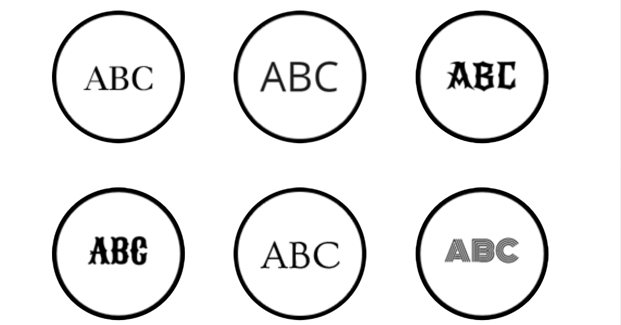
Serif
Serif fonts feel traditional and formal. They can work well for long reading text, especially in print-style layouts.
Examples: Georgia, Times New Roman
Sans-serif
Clean and modern. Sans-serif fonts are the standard choice for websites and apps because they are clear on screens.
Examples: Inter, Roboto, Open Sans, Arial
Monospace
Every character has the same width. Monospace fonts are perfect for code blocks, terminal-style UI, and “hacker” or tech aesthetics.
Examples: Courier New, Consolas, Menlo
Display
Display fonts are designed for headings and branding. They are eye-catching, but can become hard to read in paragraphs.
Examples: Impact, Lobster
Script
Handwritten-style fonts that can work for short accents, but are rarely accessible for body text.
Examples: Pacifico, Brush Script
Rule of thumb for beginner web design:
Use one main font for body text and one for headings. If you’re unsure, use a single high-quality sans-serif for everything.
Hierarchy helps users scan. It answers:
What should I read first?
What is most important?
What action should I take?
To create hierarchy, vary:
font size
weight (regular vs bold)
spacing
colour
position
In a school project (like a website or app interface), hierarchy is the difference between “hard to follow” and “knowing where to look.”
Spacing is where some beginner designs fall apart.
Key spacing concepts:
Kerning: space between individual letters
Tracking: space across a group of letters
Leading: space between lines of text
You don’t need to manually kern most web text, but you do need sensible line spacing.
CSS tip:
For paragraphs, start with:
line-height: 1.5 to 1.7
It instantly improves readability.
Left-aligned text is usually easiest to read on screens. Centred text can work for short headings, but often becomes hard to scan when used too much.
Consistency is the real “professional” move:
consistent heading sizes
consistent font weights
consistent spacing between sections
consistent button text style
If your website or student project feels “messy,” try these 5 typography fixes:
Use 1–2 fonts only (one for headings, one for body text)
Increase line spacing so paragraphs breathe
Use clear heading sizes (H1, H2, body should look obviously different)
Avoid long lines of text (keep paragraphs narrow)
Check it on mobile before you call it finished
Want a guided way to practise typography skills like this?
Our Code Avengers Typography course teaches these concepts through interactive activities and web design tasks.
These are slightly different:
Legibility = how easy it is to recognise characters
Readability = how easy it is to read and understand a block of text
A font can be legible (you can see each letter clearly) but still not readable if the spacing, line length, or contrast is poor.
In 2026, most users access web content on mobile first. Typography needs to scale smoothly from phone to laptop.
Responsive typography helps you:
avoid tiny text on mobile
keep headings balanced on wide screens
prevent line lengths that feel exhausting
Top tip:
Make sure you test your digital outcome on a range of devices and screen sizes.
Use this checklist as a fast quality filter for any digital project:
Is body text large enough to read on mobile?
Are headings clearly different from body text?
Do paragraphs have enough line spacing?
Is the contrast strong enough (especially for grey text)?
Are there enough, but not too many fonts or font styles?
Do buttons and links look consistent across pages?
Can someone scan the page and find key information quickly?
If the answer is “yes” to most of these, your typography is doing its job.

Typography is one of the fastest ways to make any digital project look more polished and easier to use, whether you’re building a website, a game interface, or an app-style layout.
Here are a few changes you can apply immediately:
Use clear typeface choices (serif vs sans-serif) to match the purpose of your project
Build visual hierarchy so headings, buttons, and key information stand out
Improve readability with line spacing, letter spacing, and paragraph styling
Keep your design consistent across devices using CSS-based typography
If you’re teaching, these also make excellent success criteria for student digital outcomes.
In Code Avengers, our Typography course takes learners from the fundamentals to real web design application using CSS. You’ll explore:
Typeface types (serif, sans-serif, and more) and when to use them
The features of fonts and the key parts of a character
How to code fonts on websites and choose from font libraries like Google Fonts
Formatting text in CSS (including paragraph styles, spacing, resizing, and hierarchy)
Creating mood and purpose through typography (and how font + colour choices work together)
Extra styling effects like outlines, shadows, and icons using Font Awesome
It’s a great option for students building web projects, and for teachers looking to strengthen design skills that connect directly to digital technology or computing outcomes.
Explore the Typography course with a free trial, or if you’re a school, request pricing and a quote for your class.
Sign up for a free trial of our Typography Course today and start creating visually stunning designs!